***PLEASE NOTE The VelocityOne Rudder requires a connection to the VelocityOne Flight System for full Xbox compatibility.***
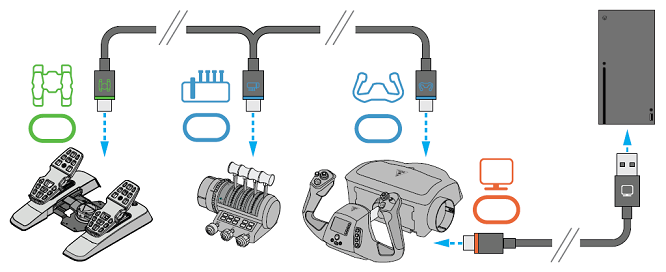
Use the Pass-Through cable to achieve Xbox compatibility via the VelocityOne Flight System.
- Start with the VelocityOne Flight* connected to an Xbox console and set to the Xbox Input Mode.
- *VelocityOne Flight must be running the latest firmware to enable compatibility.
- PLEASE NOTE: If updating the VelocityOne Flight via the console, first disconnect the rudder and the rudder cables, and make sure that only the VelocityOne Flight's USB-C cable is connected/used.
- Remove the existing USB-C to USB-C cable from the yoke and throttle quadrant of the VelocityOne Flight.
- Connect the pass-through cable to match the corresponding port colors, as shown.
- Push and hold the Mode buttons on the pedals for three seconds, and then release. The Status LED will turn BLUE.
- On the VelocityOne Flight FMD, navigate to the Accessories menu and enable the Rudder Panels.


